
Creating Component Scripts
This guide will help you quickly set up and create component scripts for the Box3 Engine. Through component-based development, you can better organize and manage your game code.
Installing the Component Library
You can install the @dao3fun/component library in the following two ways:
Method 1: Install with the ArenaPro Plugin (Recommended)
- In the VSCode editor, press
Ctrl + Shift + P(Windows) orCommand + Shift + P(macOS) to open the command palette. - Search for "ArenaPro" and run the
ArenaPro: View Box3 NPM Packagescommand. - In the pop-up input box, enter
componentto search. - Click on
@dao3fun/component, then click "Confirm Installation" in the bottom-left pop-up. - Wait for the installation to complete. A success message will appear in the bottom-right corner of VSCode.
Method 2: Install with the npm Command Line
Open a terminal in the project's root directory and run the following command:
bash
npm install @dao3fun/componentConfiguring Component Templates
After installation, you can configure the feature to automatically generate component templates:
- Open the
dao3.config.jsonfile in the project's root directory. - Add or modify the
ECSconfiguration item:
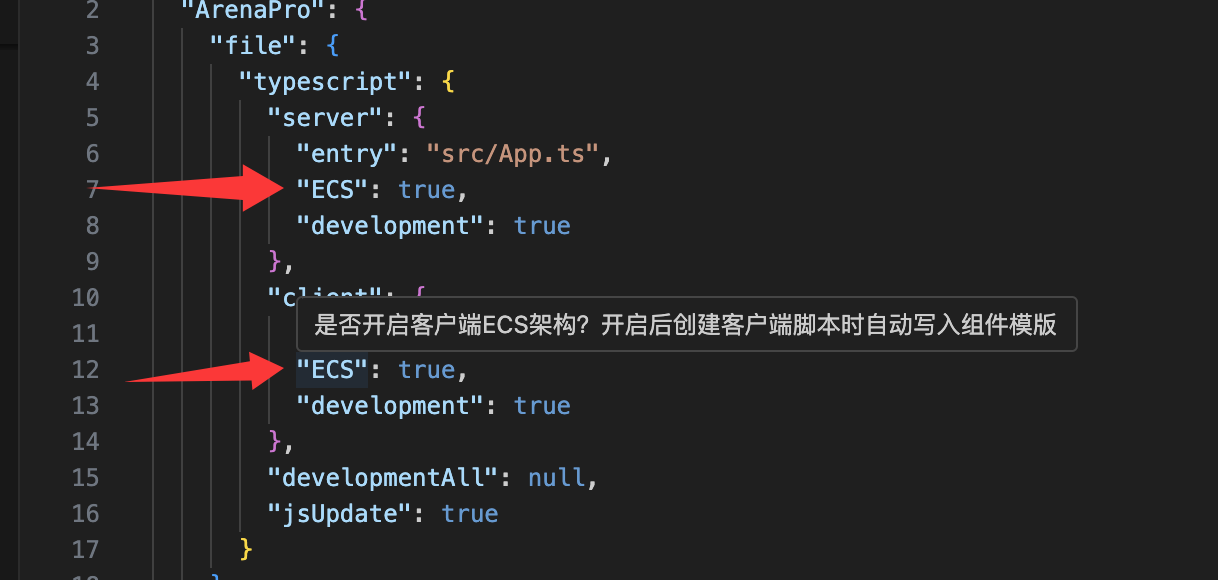
After configuration, a component template will be automatically generated each time you create a new .ts file.
Creating Component Scripts
Automatic Creation (Recommended)
- In the VSCode Explorer, right-click the directory where you want to create the script.
- Select "New File".
- Enter the file name (ending with
.ts), such asNewComponent.ts. - Press Enter to confirm, and the component template will be generated automatically.
Component Template Structure
typescript
import { _decorator, Component, EntityNode } from "@dao3fun/component";
const { apclass } = _decorator;

@apclass("NewComponent")
export class NewComponent extends Component<GameEntity> {
  // Called when the component is initialized
  start() {
    // Initialize the component here
  }

  // Called every frame
  update(deltaTime: number) {
    // Write update logic here
  }
}Development Notes
1. Class Name Uniqueness
- Component class names must be unique throughout the project.
- They cannot be duplicated even in different directories.
- It is recommended to use descriptive class names, such as
PlayerMovement,EnemyAI, etc.
2. Decorator Usage
- You must use the
@apclassdecorator to define a component class. - The decorator parameter should be consistent with the class name.
- Example:typescript
@apclass("PlayerController")
export class PlayerController extends Component<GameEntity> {
  // ...
}
3. File Naming Conventions
- The file name should be exactly the same as the component class name.
- Use PascalCase for naming.
- For example:
PlayerController.ts,EnemySpawner.ts.
4. Advantages of TypeScript
We strongly recommend using TypeScript to write components:
- Better type checking
- Intelligent code completion
- Easier to find potential errors
- Better code maintainability
Frequently Asked Questions
- Q: Why isn't my component template being generated automatically? A: Please check if the
ECSsetting indao3.config.jsonis correctly set totrue. - Q: What should I do if I have duplicate component class names? A: Change one of the class names to ensure that all component class names in the project are unique.
- Q: How do I debug component code? A: Use VSCode's debugging features, set breakpoints, and start the debugging mode.